
Gamification means adding game-like features to apps that aren’t games. Think points, badges, and progress bars. When done right, it can make your app way more fun and keep users coming back.
This guide shows you how to add gamification that actually works. You’ll learn why it works, what features to add, and big mistakes to avoid.
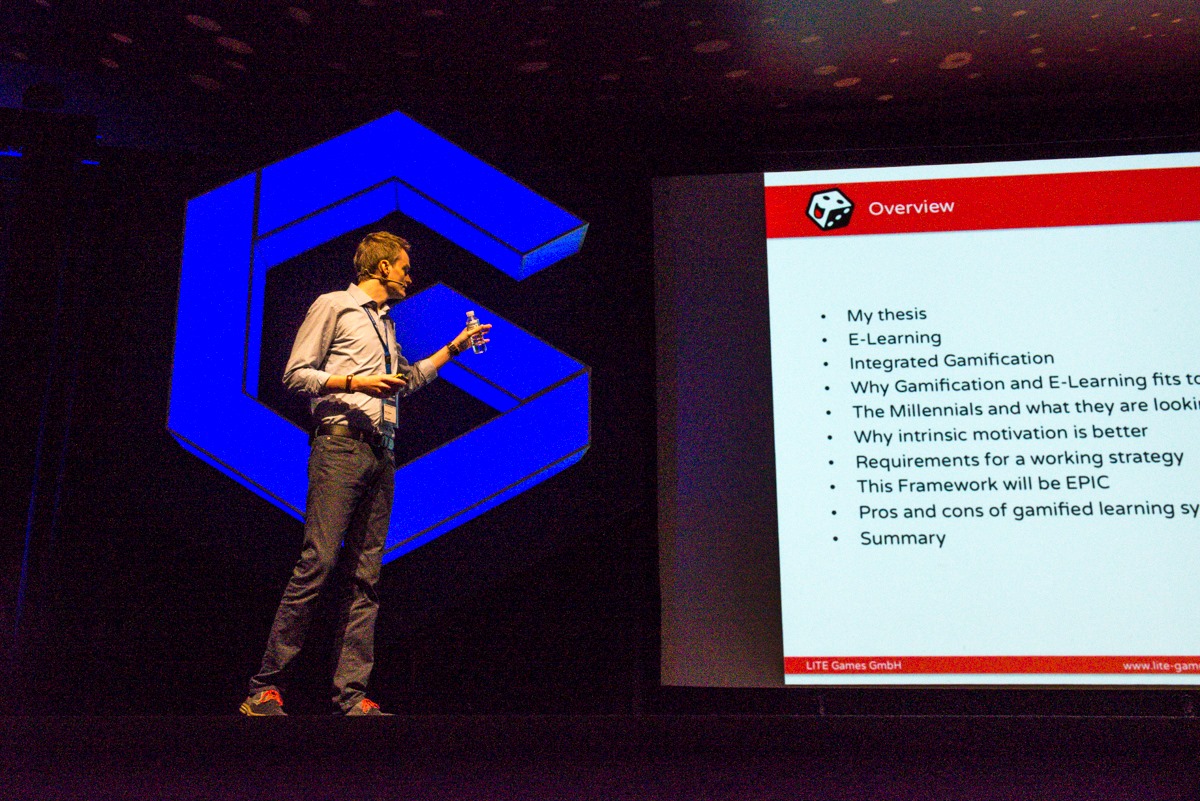
The first time I researched gamification was during my master’s thesis, where I wrote about enterprise learning environments and how to attract young professionals. Later in 2015, I had the chance to share my findings at the Gamification World Congress in Barcelona.
Why Gamification Works
Gamification works because it taps into how our brains naturally work. Here’s the simple psychology behind it.
Three Things People Need
People have three basic needs when using apps:
Choice means users want to feel in control. They don’t want to be forced to do things. Let them pick their own goals and decide how to use your app.
Getting Better means users want to feel like they’re improving. Show them their progress clearly. Celebrate when they achieve things. Make sure they can succeed if they try.
Connection means users want to feel part of something. Let them connect with friends or other users if they want to. But make it optional because not everyone likes social features.
When your app gives people these three things, they’ll use it because they want to, not just because you’re bribing them with points.

The Power of Surprises
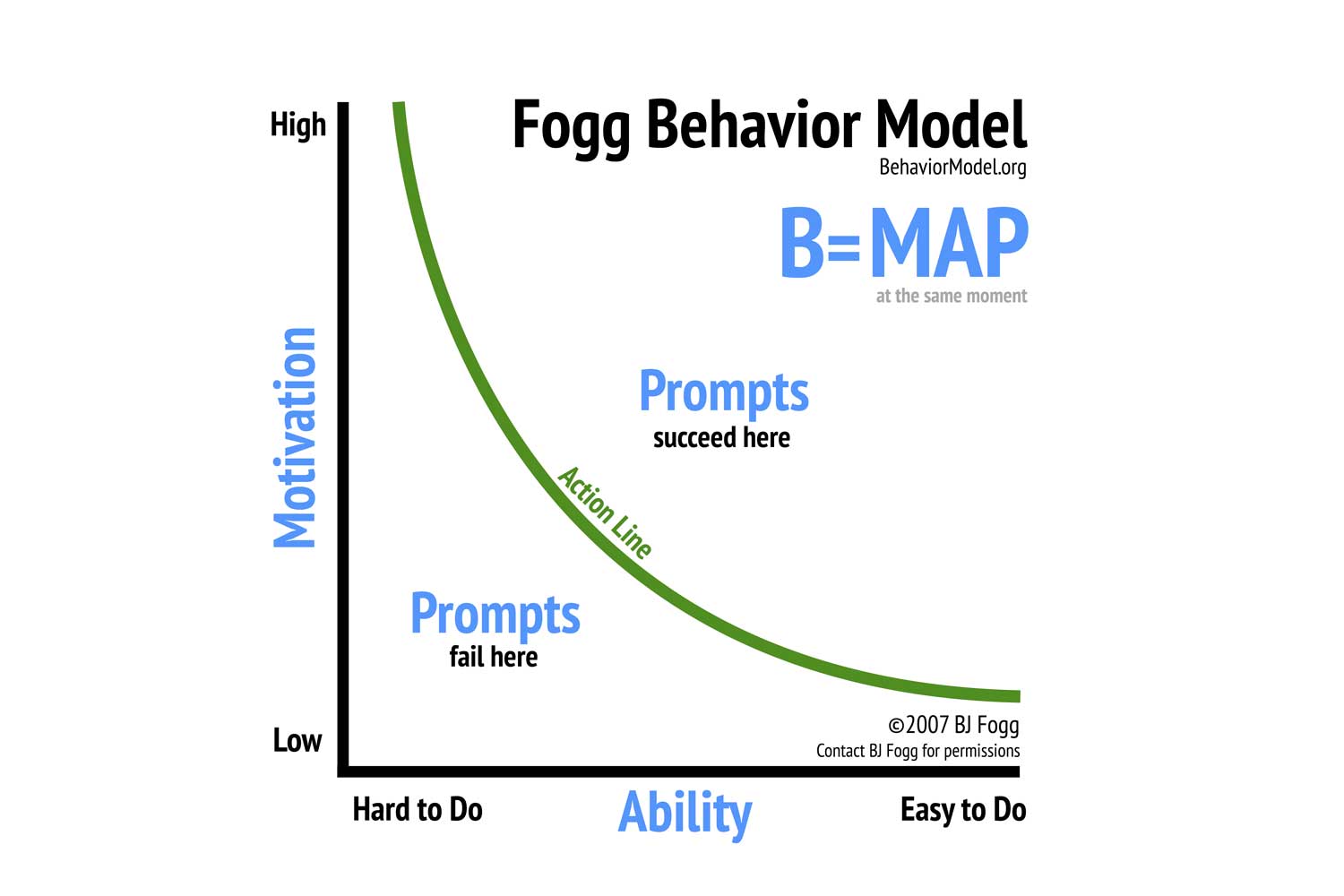
Your brain gets excited when you don’t know what’s coming next. This is why social media is so addictive. Sometimes you see amazing posts, sometimes boring ones. You never know, so you keep scrolling.
You can use this in your app by mixing up rewards. Sometimes give small rewards, sometimes big ones.
The idea behind it is the variable reward schedule. Don’t make everything predictable. The surprise keeps users interested.
Make It Easy + Make It Worth It + Remind Them
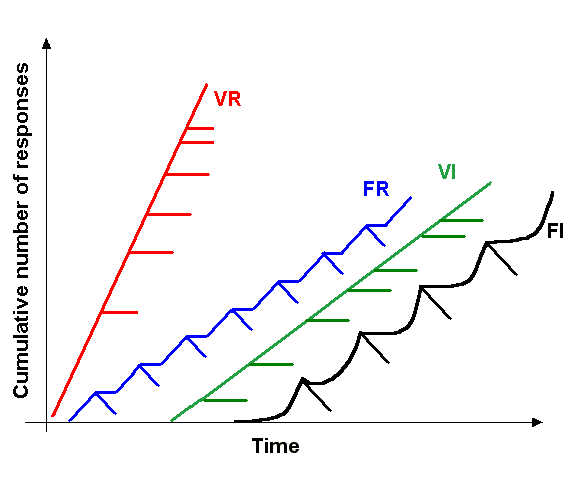
For people to do something, three things must happen at the same time:
- They want to do it (motivation)
- It’s easy to do (ability)
- Something reminds them to do it (prompt)
If any of these is missing, people won’t take action. So make your app super easy to use. Make the rewards worth it. And send reminders at the right time.
Show Progress Clearly
People work harder when they can see they’re almost done. If you’ve ever rushed to finish the last few items on a task list, you’ve felt this.
Show users how far they’ve come with progress bars. Break big goals into small steps. Give them early wins so they feel successful quickly. This keeps them motivated to finish.
Game Features You Can Add
Now let’s look at specific features you can add to your app. Pick 2-3 to start with. Don’t try to add everything at once.
Points
Points are numbers that go up when users do good things in your app. They’re simple and everyone understands them.
Use points when you want to track progress. They work great for learning apps, fitness apps, and task apps.
Make sure users understand how to earn points. Give points right away when they do something good. Don’t make points too hard to earn or too easy.
Warning: Don’t make everything about points. Some people will focus so much on points that they forget the real reason they’re using your app.
Badges
Badges are like digital trophies. Users collect them when they reach goals or do special things.
Khan Academy uses badges really well. They have moon badges for medium goals, sun badges for big goals, and black hole badges that are super rare and hard to get.
Make your badges look cool. Make sure earning them actually means something. Show them on user profiles so people can show off. Have some easy badges for beginners and some hard badges for experts.

Leaderboards
Leaderboards show who’s doing the best. They create friendly competition.
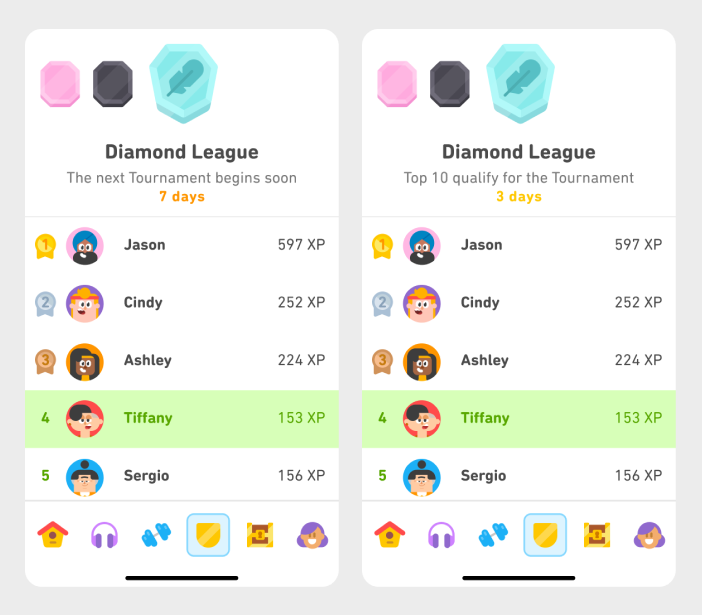
But be careful! People at the bottom of leaderboards often feel bad and quit. The solution is to make leaderboards optional. Also, put users in groups with people at their same level instead of comparing beginners to experts.
Duolingo does this by putting users in weekly leagues. Each week starts fresh, so everyone gets new chances to win. This works much better than one big leaderboard where the same people win forever.
Streaks
Streaks count how many days in a row someone uses your app. Miss a day, and the streak resets to zero.
Streaks are super powerful for building habits. Duolingo has millions of users with streaks over a week long. Some people have kept their streaks going for years!
But streaks can also cause stress. Some people feel anxious about keeping streaks alive. So give users “freeze” days where they can miss once without losing everything. Send reminders before streaks break. And make the daily requirement easy enough that people can do it even on busy days.

Progress Bars
Progress bars are simple visual bars that fill up as you complete things. Everyone knows how they work.
Use them everywhere. Show progress on courses, goals, profiles, and tasks. Update them right away so users see their progress happen.
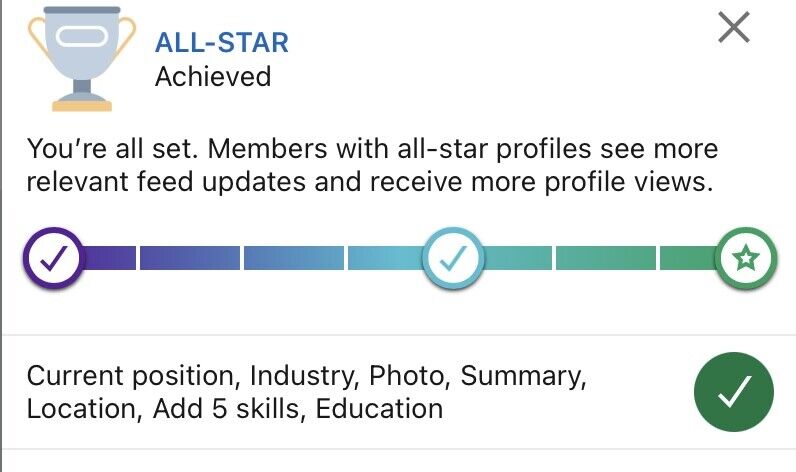
LinkedIn increased profile completion by 55% just by adding a progress meter. People saw they were almost done and pushed through to finish.
Levels
Levels are like grades or ranks. Users start at level 1 and work up to higher levels.
Make early levels quick so users feel successful fast. Make each level a bit harder than the last. Give rewards or unlock new features at each level. Show users clearly what level they’re at and what comes next.

Challenges
Challenges are special goals with time limits. They add variety and give users something specific to work toward.
Fitness apps use these really well. Strava offers monthly challenges like “Ride 100 miles this month.” Users who join challenges stick around much longer than those who don’t.
Make challenges optional. Make them clear and specific. Rotate them regularly so there’s always something new.

Social Features
Social features let users connect, compete, or work together.
You can let users add friends, create teams, share achievements, compete on leaderboards, or help each other.
But always make social features optional! Not everyone wants their activity to be public. Some people prefer to work alone. Give users control over what they share and who sees it.
Picking Features for Your App Type
Different apps need different features. Here’s what works best for each type.
Learning Apps
Best features: levels, badges, progress bars, and points.
Duolingo combines levels (skill trees), badges, points (XP), and leagues. After adding leaderboards, they saw learning time increase by 17%.
Focus on showing mastery, not just speed. Avoid making everything a competition because people learn at different paces.
Fitness Apps
Best features: activity tracking, badges, streaks, challenges, and leaderboards.
Strava uses all of these. They track every workout, give badges for achievements, let users compete on specific routes, and offer monthly challenges. This helped them reach 100 million users.
Give users multiple ways to succeed so everyone can find something they’re good at. Make leaderboards optional for people who don’t like competition.

Productivity Apps
Best features: task rewards, streaks, progress bars, and optional social accountability.
Todoist keeps it simple with a points system called Karma. You earn points for completing tasks and can set daily goals. But you can turn it all off if you just want a simple to-do list.
Forest takes a different approach. You plant a virtual tree when you want to focus. Leave the app, and your tree dies. Over time, you build a forest showing all your focus time. Simple but powerful.

How to Add Gamification to Your App
Here’s a step-by-step plan for adding gamification.
Step 1: Decide What You Want
Be specific about what you want users to do more of. Don’t just say “more engagement.” Say “complete 50% more courses” or “use the app 4 days per week instead of 2.”
Figure out what actions give users the most value. That’s what you should encourage with gamification.
Step 2: Learn About Your Users
Not everyone likes the same things. Some people love competition. Others hate it. Some want social features. Others want privacy.
Survey your users. Ask what motivates them. Ask if they want to compete with others or just with themselves. Use their answers to pick the right features.
Step 3: Pick 2-3 Features
Start small! Pick just 2-3 features that match your goals and your users’ preferences.
For building daily habits, try streaks plus progress bars. For learning, try points plus badges plus levels. For fitness, try tracking plus badges plus challenges.
Step 4: Make It Easy and Optional
Make your gamification super easy to use. Remove extra steps. Give instant feedback. Send smart reminders.
Always make gamification optional. Some users just want your basic app without game stuff. Let them turn it off.
Step 5: Test Everything
Test different versions to see what works. Try different point values. Try different badge designs. Try different progress bar styles.
Measure what matters: Are people using the feature? Are they coming back more often? Are they completing more tasks or courses?
Step 6: Keep Improving
Launch your features, then watch what happens. Look at your numbers every day. Ask users for feedback.
Change things that aren’t working. Add new challenges and badges regularly to keep things fresh. Fix problems quickly.
Big Mistakes to Avoid
Learning what not to do is just as important. Here are mistakes that ruin gamification.
Adding Points That Don’t Mean Anything
The biggest mistake is adding points, badges, and leaderboards that don’t connect to real value. If badges are too easy to get, they don’t feel special. If points don’t lead anywhere, they’re just meaningless numbers.
Every feature should help users accomplish their real goals. In a learning app, points should show actual learning, not just time spent clicking around.
Adding Too Much Stuff
Don’t add every feature just because you can. Too many game elements make your app confusing and overwhelming.
Start with 2-3 features. Add more only if you really need them. Your app should help users do what they came for, not feel like a complicated game.
Treating Everyone the Same
Not everyone likes competition. Not everyone wants social features. Not everyone wants game elements at all.
Make features optional. Let users customize their experience. Give people choices in how to use your app.
Making Things Too Hard or Too Easy
If features are too easy, they feel meaningless. If they’re too hard, users give up.
Make early goals easy so users feel successful quickly. Slowly make things harder. Watch your data to see where users are struggling and adjust.
Forgetting About Long-Term Users
Most apps focus on new users and forget about people who’ve been around for years. When users max out levels and earn all badges, what keeps them coming back?
Plan for long-term users from the start. Can you add new content regularly? Can you reset competitions monthly or seasonally? Can you let advanced users help beginners?
Forcing Social Sharing
Making social features mandatory pushes away users who value privacy. Requiring people to share on social media to unlock features feels pushy.
Always make social features optional. Let users choose what to share and with whom. Default to private and let users open up if they want.
Manipulating Users Instead of Helping Them
The worst mistake is using psychology tricks just to keep users hooked without actually helping them.
Ask yourself: Does this help users reach their goals, or just our business goals? Would users choose this if they understood the psychology behind it? Are we creating value or just grabbing attention?
Design for user well-being, not just engagement numbers. Be proud of how your app affects people’s lives.
Simple Action Plan
Here’s what to do right now.
If You’re Starting Fresh
- Survey people about what they want and need
- Pick 2-3 features that fit your app type
- Make sure users feel in control, see their progress, and can connect with others
- Make everything easy to use
- Test with a small group first
- Fix what’s broken and roll out to everyone
If You’re Adding to an Existing App
- Figure out your biggest problem (low retention? poor completion rates?)
- Ask current users what they’d like
- Add just ONE feature that addresses your biggest problem
- Test it with half your users
- Watch the results carefully
- Roll it out if it works, or try something else if it doesn’t
If Your Current Gamification Isn’t Working
- Look at your data to see what’s failing
- Ask users what they dislike about current features
- Remove features that users ignore or hate
- Redesign based on the ideas in this guide
- Test your new version with a small group
- Keep improving until it works
Final Thoughts
Gamification works because it taps into how people naturally think and feel. When done right, it helps users stay motivated, see their progress, and accomplish their goals.
The key is keeping users at the center. Don’t add game features just because other apps have them. Add features that genuinely help your specific users do what they came to do.
Start simple with 2-3 features. Make them optional. Make them easy to use. Make them meaningful. Test everything. Keep improving based on what you learn.
When you’ve succeeded, users won’t think “this app is gamified.” They’ll think “this app helped me learn a new language” or “this app helped me get fit” or “this app helped me save money.” The best gamification helps people win at their real goals.
That’s the standard to aim for. Build features that make people’s lives genuinely better, and your app will naturally succeed.